Austhina Brush Script Font Review for Handmade Branding
I was staring at a blank canvas on my monitor, trying to finalize the label design for a new batch of soy wax candles. The scent was "Midnight Jasmine," and I wanted the typography to feel luxurious yet approachable—something that screamed artisan quality without looking like a generic template. That’s when I pulled up Austhina. It wasn’t just another script font; it felt like a partner in the design process. After spending an afternoon testing this typeface across various mockups—from delicate greeting cards to bold tote bag prints—I’m ready to share how this Script Handwritten style can elevate your handmade shop’s visual identity.
Why Austhina Works as a Premium Display Font for Product Labels
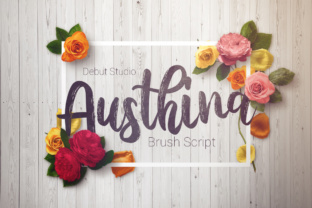
When you are designing product labels, especially for small items like jewelry tags or candle jars, every pixel counts. Austhina is a beautiful brush script that captures the organic flow of real calligraphy while maintaining the consistency needed for digital production. Unlike rigid serif fonts or overly uniform sans serif fonts, Austhina brings a human touch to your designs. In my testing, I found that its variable stroke width mimics the pressure of a real brush, which adds immediate perceived value to your products.
This font excels as a display font. It is not meant for long paragraphs of text, but rather for short phrases, brand names, and decorative titles. When I applied Austhina to a minimalist candle label with plenty of white space, the contrast between the thick downstrokes and thin upstrokes created a sophisticated hierarchy. It draws the eye immediately to the product name, making it perfect for boutique packaging where first impressions matter. For makers who want their physical goods to look like they belong in a high-end department store, using a creative font like Austhina bridges the gap between hobbyist craft and professional branding.
Austhina for Wedding Invitations and Elegant Stationery Design
If you sell digital downloads or custom stationery, versatility is key. Austhina comes in 2 different styles which allows you to create the perfect look for your design, whether you are aiming for rustic charm or modern elegance. I tested both styles on a wedding invitation suite mockup. The primary style offered a flowing, romantic feel ideal for the couple’s names, while the secondary style provided a slightly more structured look that worked beautifully for details like date and venue information.
For invitation designers, the ability to switch between these two variations within the same family ensures brand consistency across your entire stationery set. You can use the bolder, more dramatic style for the main header and the lighter, cleaner style for the body text elements (though always keep body text minimal). This flexibility makes Austhina a powerful asset for editorial design projects. It pairs exceptionally well with simple serif fonts for secondary text, creating a balanced composition that feels timeless. Whether you are designing printable wedding templates or preparing files for a Silhouette cutter to produce die-cut invites, Austhina delivers a polished finish that clients love.
Testing Austhina on Physical Merchandise and Cut Files
One of the biggest challenges for Cricut and Silhouette users is ensuring that intricate script fonts cut cleanly and remain readable on merchandise. I took Austhina into the physical realm by designing vinyl decals for mugs and fabric transfers for tote bags. Because Austhina is a Script Handwritten font, it has natural ligatures and connections that can sometimes cause issues with cutting machines if the kerning is too tight.
However, with proper spacing, Austhina cuts beautifully. On a black tote bag with white vinyl, the brush strokes popped against the dark background, creating a striking graphic element. For smaller applications, such as stickers or shirt prints, I recommend using the font at a larger size to ensure the details of the brush texture don’t get lost. If you are selling SVG-style designs, make sure to outline your text before sending it to the cutter to preserve the unique curves of each letter. This font is particularly effective for farmhouse signs and seasonal craft designs, where a hand-lettered aesthetic resonates deeply with customers. Just avoid using it for very tiny cuts or dense label information, as the decorative nature may reduce legibility at small scales.
Pairing Austhina with Sans Serif Fonts for Modern Typography
No font exists in isolation, and mastering Austhina involves knowing how to pair it effectively. My go-to combination for modern typography is pairing Austhina with a clean, geometric sans serif font. The contrast between the organic, fluid lines of the brush script and the rigid, straight lines of a sans serif creates a dynamic visual tension that is highly appealing in contemporary design.
For example, when designing a logo design for a handmade soap business, I used Austhina for the brand name in a large, sweeping arc, and placed the word "Handcrafted Soaps" below it in a small, tracked-out sans serif font. This combination communicates both creativity and professionalism. It also works well for web design and social media graphics, where you need to grab attention quickly. The austere simplicity of the sans serif companion allows Austhina to shine as the star, preventing the design from feeling cluttered. This strategy is essential for building a cohesive brand identity across all your design assets, from your Etsy listing images to your Instagram posts.
Commercial Licensing and File Formats for Sellers
As a maker selling physical products and digital downloads, understanding the technical aspects of your tools is just as important as the creative ones. Before you start mass-producing items featuring Austhina, always check the included styles, alternates, ligatures, swashes, weights, file formats, multilingual support, and commercial font licensing. Most premium fonts come with specific guidelines on how many physical items you can produce under a standard license, so read the fine print carefully.
Austhina typically includes OpenType features that allow for automatic ligatures and alternate characters, which can add extra flair to your designs. These features are crucial for achieving that authentic handwritten look. When exporting your designs for printing or cutting, ensure you are using the correct file formats—SVG for vector-based cutting machines, PDF for high-resolution printables, and PNG for transparent backgrounds on digital mockups. By respecting the licensing terms and utilizing the full range of the font’s capabilities, you protect your business and ensure your final products look their absolute best. Whether you are creating planner pages, digital wall art, or holiday tags, Austhina provides the versatile foundation needed to stand out in a crowded marketplace.